Free The essentials
KES 0 / month
Support links, QR codes, live alerts and your core stream overlay.
5% per successful M-Pesa tip. Includes payment processing. You keep KES 950 from a KES 1,000 tip.
Start freeDesign your overlay, manage live alerts and receive support through M-Pesa.
Sign up with YouTube. No monthly subscription on Free. Fees apply to tips.

Broadcast with
 OBS Studio
 Streamlabs
Stream on
 YouTube
 Twitch
 Kick
KickSign up with the Google account that manages your YouTube channel.
Arrange your alerts, chat and QR code in Studio.
Add your canvas to OBS or Streamlabs as a Browser source.
NiTip Studio
Arrange QR codes, alerts, chat and goals on one canvas. Style each widget, then connect it to OBS or Streamlabs with a single Browser source.
Set up an overlayExplore a curated selection of scene designs.
Switch scenes, replay alerts and send reactions without losing track of chat.
NiTip Companion
Plan your segments, shape your canvas with AI, and keep your next move in view while you stream. Companion brings your prep and creative tools together.
Plan your next stream CompanionInteractive example
Tips & payments
Share a link or show a QR code. Viewers choose an amount and confirm on their phone. With VidTip, each published YouTube video can have its own support page.
Live or watching later, your audience has a way to support you.
How tips & payouts work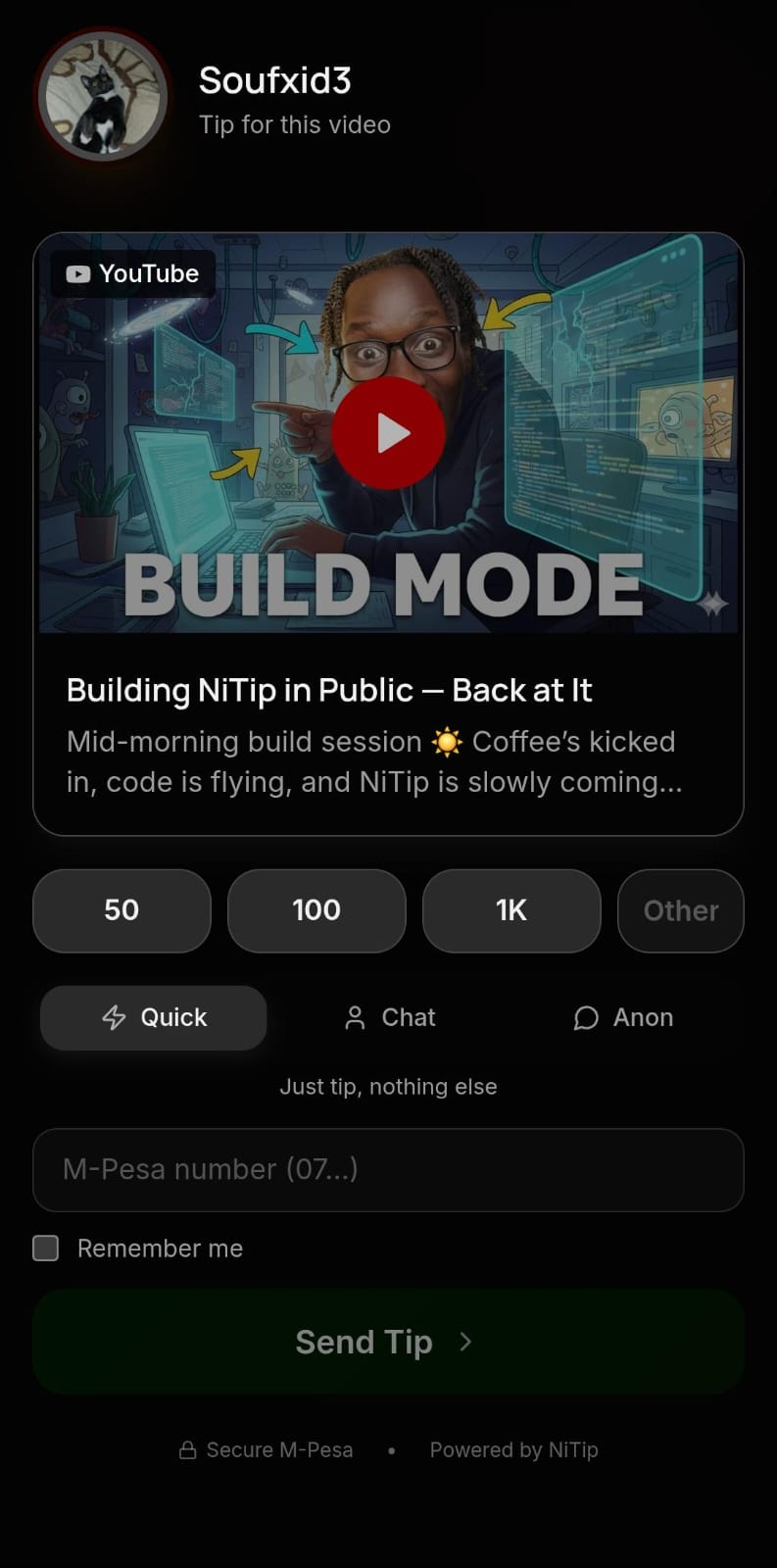
Sponsored moments
A place for brands, events and fellow creators in your show.
Have a business to promote? Tell us about your audience, idea and budget.
Discuss a campaignPricing
Choose the tools that fit your stream.
KES 0 / month
Support links, QR codes, live alerts and your core stream overlay.
5% per successful M-Pesa tip. Includes payment processing. You keep KES 950 from a KES 1,000 tip.
Start freeMore ways to make it yours.
Explore planned themes, reusable styling and sponsored-placement controls.
KES 500 / month · planned price. Pro is not available to purchase yet.
Final billing terms, usage limits and transaction fees will be confirmed before activation. Campaign budgets and third-party theme licences are separate. Sponsorship income is not guaranteed.
Ask about Pro| Feature | Free | Planned Pro |
|---|---|---|
| M-Pesa support | Support link and QR code | Included |
| Wallet and live monitoring | Earnings, payouts and connected chat | Included |
| Stream overlay | Core QR, tip alerts and goals | Included |
| NiTip themes | Standard overlay appearance | Theme presets and coordinated scene designs |
| Theme customisation | Core widget setup | Save and reuse your theme styling |
| Creator ad controls | No self-managed placement controls | Choose placement format, position, timing and visibility |
KES 100K+Tips processed through NiTip.
Built around creators.
Talk to the team
Account setup, streaming tools and payments.
Payment & payout guideTalk to the NiTip teamBuild your stream canvas in Studio, manage scenes and live alerts, and receive community support through M-Pesa. Connect your canvas to OBS or Streamlabs with a Browser source.
Use the Google account that manages your YouTube channel. NiTip currently uses YouTube for creator sign-in, including if you broadcast your overlay to Twitch or Kick. You will review the requested permissions with Google before returning to NiTip.
Viewers scan your on-screen QR or open your support link, choose an amount and complete the M-Pesa prompt on their phone. Share a clickable link for people watching on the same phone.
Use the NiTip Browser source in OBS or Streamlabs when broadcasting to YouTube, Twitch or Kick. YouTube sign-in and connected chat are available now. Direct Twitch and Kick account and chat integrations are coming soon.
The examples on this page show how a business, event or creator could appear on your canvas. Creator controls for format, position, timing and visibility are planned for Pro. Advertising bookings and campaign budgets are arranged separately with hello@nitip.africa.
Sign up with YouTube, confirm your creator profile and complete payout setup. Check that payments are activated and test your support link before sharing it. You can also build your canvas in Studio and add its Browser source to OBS or Streamlabs.
Yes. VidTip connects a support link to a published YouTube video so you can see which video inspired each tip. Add the link to its description, and include a QR when making a new video.
The Free plan has no monthly subscription. You keep 95% of every successful M-Pesa tip, with one 5% fee covering NiTip and payment processing. A KES 1,000 tip leaves you KES 950 after the fee.
Complete your payout details in your NiTip account and check your payment and payout status there. Contact support@nitip.africa if you need help with a payout. A successful tip confirmation and a completed payout are separate steps.
Pro is planned at KES 500 per month for NiTip theme presets, reusable theme styling and creator control over ad placement format, position, timing and visibility. It is not available to purchase yet. Final billing terms, usage limits and transaction fees will be shown before activation. Advertising budgets and third-party theme licences are separate.
Connect your YouTube channel, finish your setup, and make the next stream yours.